Vibraguard
Asset and work order management for maintenance teams. Link devices by QR code, monitor their status and track maintenance work in one app.
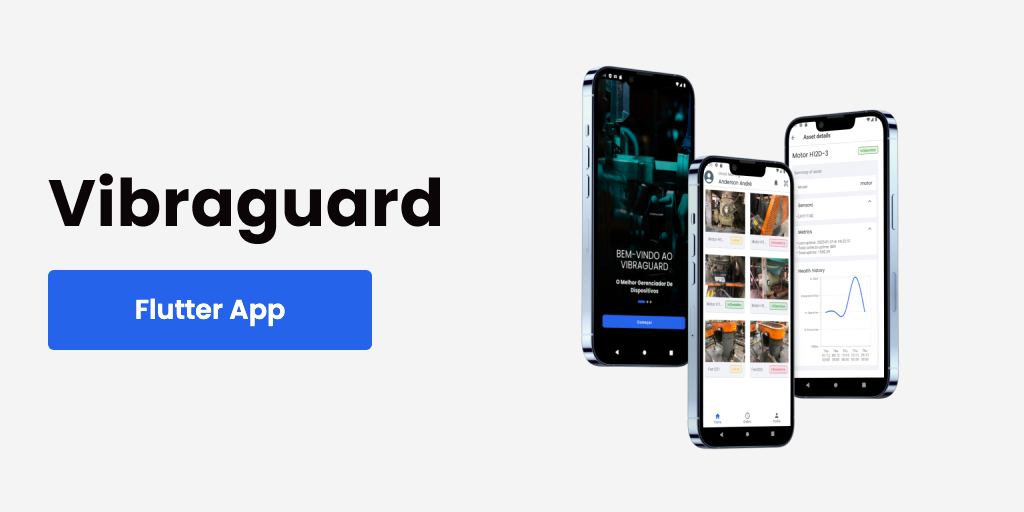
- Type
- Technical challenge
- Year
- 2023
- Stack
- FlutterMVVMMobXProviderGetItDiomobile_scannerSyncfusion Charts
Overview
VibraGuard is an asset and service management app for maintenance teams, engineers and asset managers. It brings monitored devices and work orders into one place, so a technician can check an asset's status and act on it from their phone.
The problem
Maintenance teams lose time when asset data and work orders live in different places, and manual device registration leads to typing errors. The app focuses on three things: seeing the state of every monitored asset, tracking maintenance work, and linking devices quickly and without mistakes.
What the app does
- QR code linking: scan a device's QR code to link it to the platform, with no manual entry.
- Device monitoring: a list of every monitored asset with its status, history and location.
- Device details: real-time metrics, maintenance history and documentation for each asset.
- Work orders: track open and completed orders and prioritize maintenance tasks.
- Work order details: description, status, people responsible and action history.
- Onboarding, sign in and sign up, with form validation.


Technical decisions
- MVVM architecture: business logic, UI and data representation live in separate layers. Each layer can change on its own, which lowers the risk of side effects when updating a screen.
- MobX for reactive state, with GetIt for dependency injection, keeping view models independent from the widgets that use them.
- Dio for HTTP requests, with logger to make network issues easier to trace.
- mobile_scanner and qr_flutter for reading and generating QR codes.
- Syncfusion Flutter Charts to show device metrics.
- Husky git hooks and flutter_lints to keep the codebase consistent.
The design was made in Figma before implementation.
Outcome
The result is a modular codebase that follows Clean Code principles, where new screens and features can be added without touching unrelated layers.